
So, you’ll probably have your own easy way of doing this. But, for those that don’t yet, here’s one simple way to quickly plot your Z32 solution on the Phillips 66 map and discover where it actually lands you.
Here I’m going to be using only an old version of Microsoft Word and a copy of the Zodiac Phillips Map. The example I’m going to be working with is one chosen completely at random, but which nonetheless has a nice, natural ‘read’ to it.
We use, then:
AT FOUR AND A THIRD INCHES RADIAN EIGHT
from:
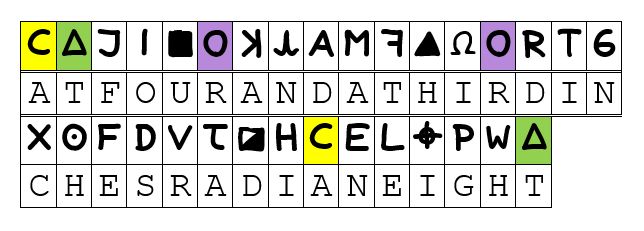
‘RADIAN EIGHT’, here, assumes the given division of the superimposed compass rose over Mount Diablo, which The Zodiac has suggested we divide into twelve equal sectors of 30° each. Radian eight, therefore, it that “radial line” extending from Mount Diablo at a bearing of (8 × 30°) + 17° = 257° from map north, the last term added to make the adjustment to Magnetic North, as indicated.
Let’s get into it, then.
[cont…]
“This isn’t right! It’s not even wrong!”—Wolfgang Pauli (1900–1958)
[…cont.]
So, we start by creating a new Word document and, to this, we add a New Drawing Canvas. Into this canvas we can then add our image of the Phillips 66 map. Setting the colour scheme to a grey-scale can help maximise the contrast later.
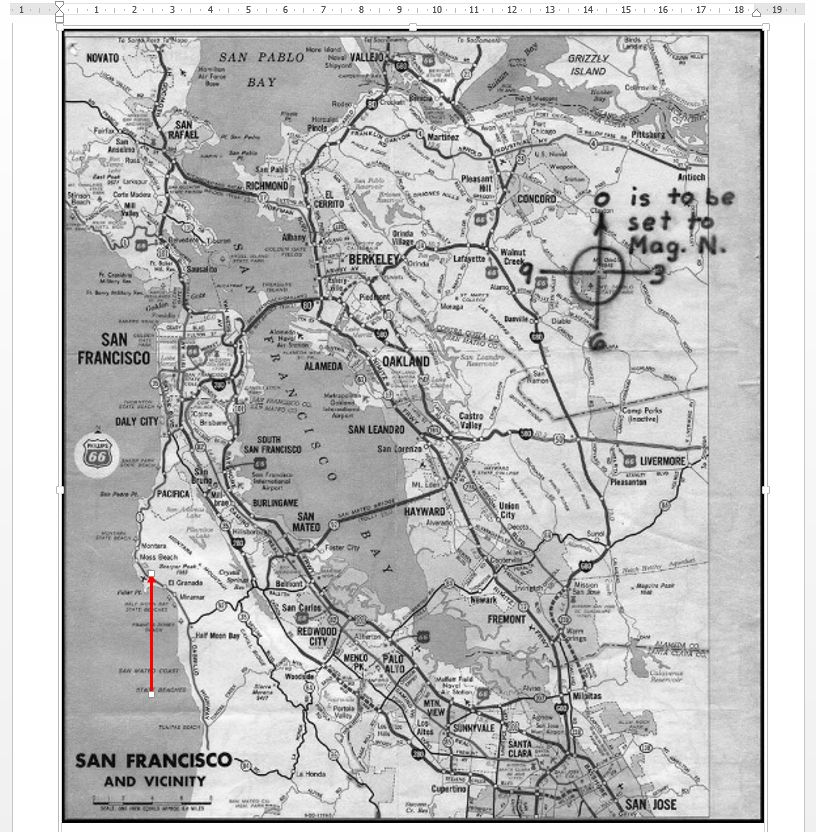
Onto this canvas we next add a vertical arrow, as below, ensuring that it is precisely up and down whilst, for the moment, its length is somewhat arbitrary. We are next wanting to set the length to the equivalent of one inch on the map.
To this point, then, we have:
“This isn’t right! It’s not even wrong!”—Wolfgang Pauli (1900–1958)
[…cont.]
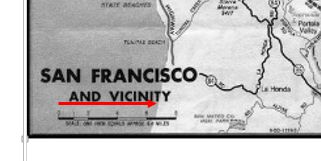
To get the correct scale for our arrow, we have next to first rotate it through 90° clockwise, drag it down towards the scale at the bottom-left of the map, and adjust it until we feel we have matched the unmarked 6.4 mile point, so:
“This isn’t right! It’s not even wrong!”—Wolfgang Pauli (1900–1958)
[…cont.]
We next want to adjust its length.
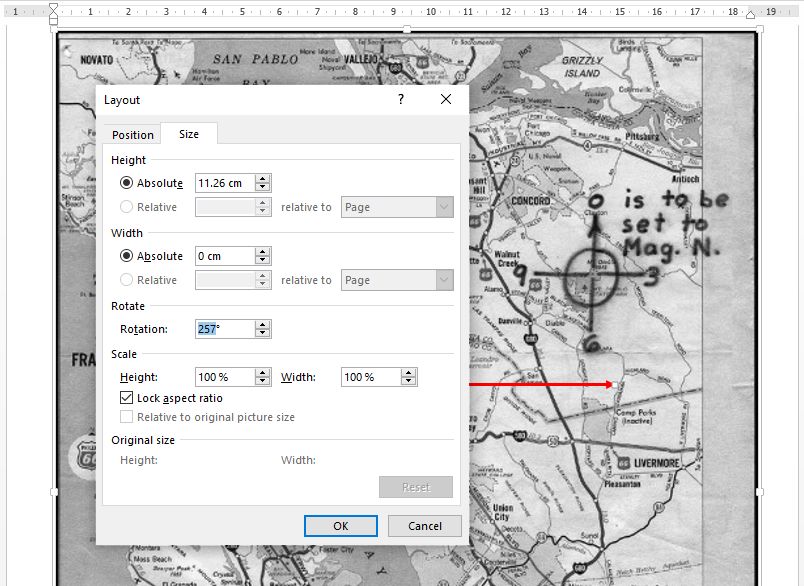
As it is, we have it at 100% scaling and it is modelling 1 inch on the map. For our example here, we want it to model 4 ⅓ inches. Consequently—and first ensuring that we have checked ‘Lock aspect ratio’—we can set the scale to 433% as close enough.
We now come back to the angle and, as we have seen, we are wanting this to be 257° from straight up the page, and thus we can set this directely as below:
“This isn’t right! It’s not even wrong!”—Wolfgang Pauli (1900–1958)
[…cont.]
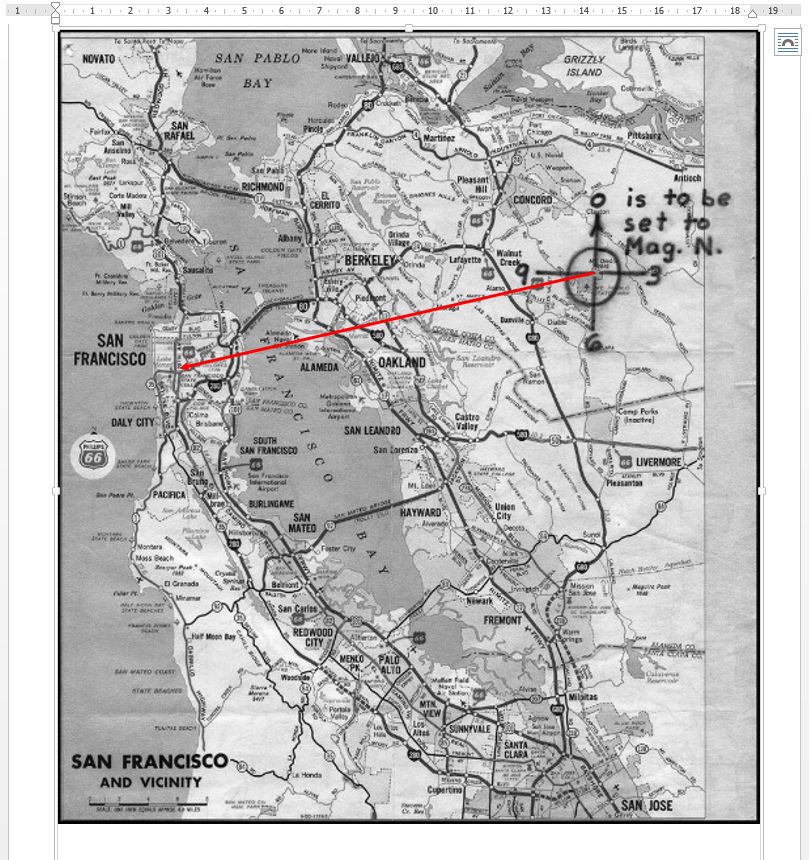
It’s then just a case of repositioning the arrow so that the base lands on the ”+” sign on Mount Diablo, so:
“This isn’t right! It’s not even wrong!”—Wolfgang Pauli (1900–1958)
[…cont.]
This takes us, for this example, to somewhere in the region of West Portal in San Francisco, roughly.
“This isn’t right! It’s not even wrong!”—Wolfgang Pauli (1900–1958)
Quite understandably we may, at this point, feel a sense of dissatisfaction at the impreciseness inherent in the result of our efforts. We have determined, in this example, only “somewhere in the region of West Portal in San Francisco.” It is, then, natural that our questioning mind turns immediately to: “Yes, but where exactly in West Portal.” We were hoping to find a pin-point location and all we have achieved is “around here, somewhere.”
There is, however, a cruel truth here.
According to the fundamental rules of data analysis, having been provided with an input data set to any given degree of precision or accuracy, we cannot therefrom derive and output any result of increased precision or accuracy.
We might strive to manipulate our data in all manner of seemingly plausible ways, but the best that we could thereby hope for is not to err and end up with even less precision. Having been provided with an input data set accurate to, say, two significant figures, we can only hope to obtain a result accurate to the same two significant figures, and we may get less.
What we are given is a somewhat imprecise map and a, likely, equally imprescise coordinate pair (bearing, range). We have done the best that we can achieve to get even “West Portal” from our efforts.
“This isn’t right! It’s not even wrong!”—Wolfgang Pauli (1900–1958)
Of course, all is not completely in vain, despite the limits of our data set (map, coordinates). We still have one more datum to consider.
At the very least, we can take a walk around our general West Portal neighbourhood, in the hope of stumbling upon something that viably and uniquely matches this:
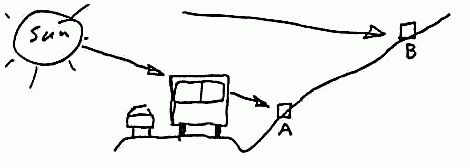
This is what we were tasked to be looking for, isn’t it?
Happy hunting!
“This isn’t right! It’s not even wrong!”—Wolfgang Pauli (1900–1958)

Microsoft Word sucks
“Sometimes it is the people no one can imagine anything of who do the things no one can imagine.”
― Alan Turing
Best regards,
-David Stampher, the solver of Mount Diablo code aka Z32.
Cracked using the Python programming language in December 2025 using modern computational techniques.
Code: https://github.com/dstampher/zodiac-z32-cipher
Paper: https://zenodo.org/records/18645227
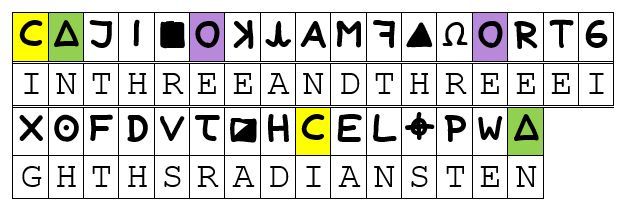
To run a further example, this time using an actual proposed solution, we can take a look at DMW’s proposal from 2019 (see here), which gave us:
IN THREE AND THREE EIGHTHS RADIANS TEN
from:
“This isn’t right! It’s not even wrong!”—Wolfgang Pauli (1900–1958)
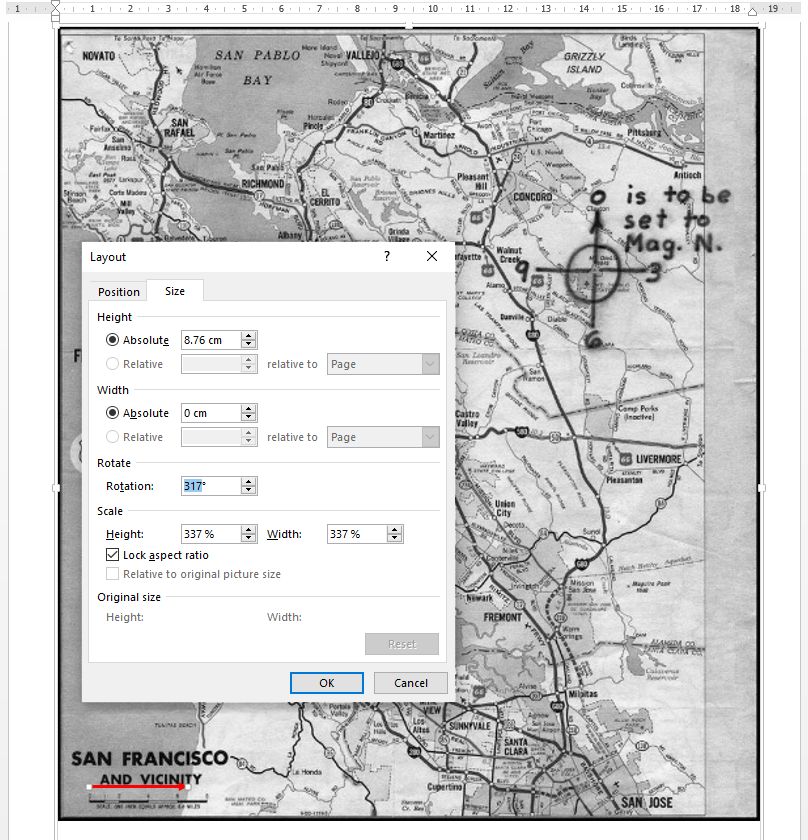
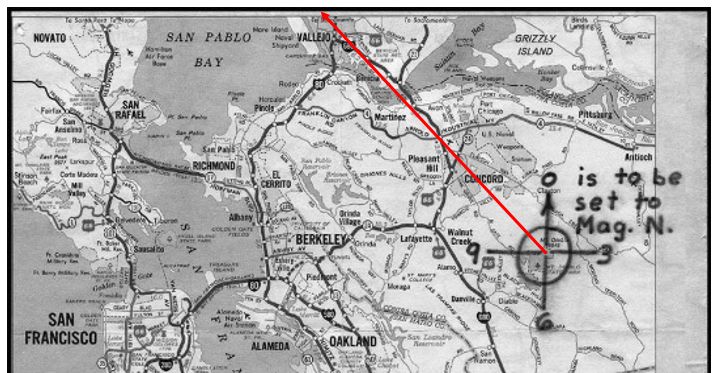
To plot this example we need, as detailed in DMW’s paper, a clockwise angle from straight up of 317° and a vector length of 3.375′′, according to the given map scale. Thus, we adjust our standard inch arrow like so:
“This isn’t right! It’s not even wrong!”—Wolfgang Pauli (1900–1958)
From these steps, we reach a result as below:
“This isn’t right! It’s not even wrong!”—Wolfgang Pauli (1900–1958)
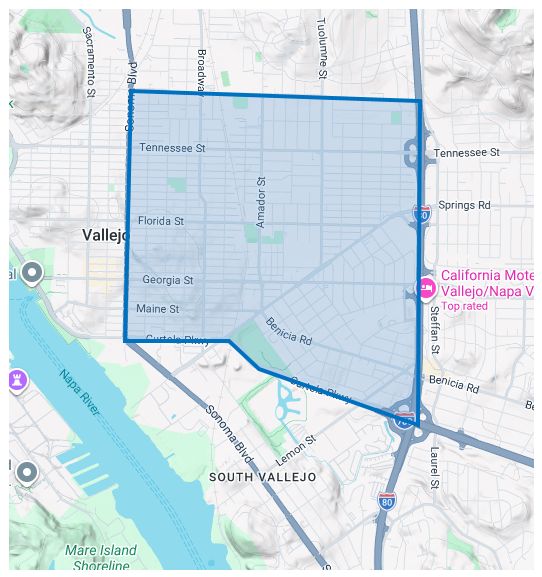
From the surrouding features that we can find present on the sparse Phillips map, we can then identify our broad search area as lying in Vallejo, bounded roughly by the Sonoma Boulevard to the West, Curtola Parkway to the South, the I80 to the East and something like Nebraska Street to the North.
That is, from the rough data given, our search boundary in DMW’s example would be something like:
“This isn’t right! It’s not even wrong!”—Wolfgang Pauli (1900–1958)
Again, this might initially be felt to be an unsatisfyingly broad result. However, as noted above, we only have (as data) the features of the Phillips Map to work with, and can ultimately do nothing other than to accept the limitations imposed on us.
“This isn’t right! It’s not even wrong!”—Wolfgang Pauli (1900–1958)
Just a quick request for anyone who is around to see this.
When considering the instruction on the Phillips Map to align to magnetic north, I have always used 17° east for the magnetic declination in the Bay Area around 1970. However, I cannot remember where I would have sourced this from specifically, and I have seen some people using a value of 16°, from time to time.
Is anyone willing to offer a source for whichever value they are using, since even 1° over the width of the Phillips Map can make a significant difference to where we are ultimately pointing?
Thanks.
“This isn’t right! It’s not even wrong!”—Wolfgang Pauli (1900–1958)